

 Loading...




Play Bad Ice Cream online for free and turn every level into a tiny ice puzzle. You collect fruit, dodge silly enemies, and reach the exit before time runs out. Start the browser game instantly on bigtallsmall.net and begin solving chilly mazes in seconds.
This guide is made for kids, teens, and families. Everything here is about the online browser game experience: simple controls, safe tips, and clear steps you can try right away.
Looking for more brainy maze fun? Explore our Puzzle Platformer Games category and pick your next challenge.
What is Bad Ice Cream game?
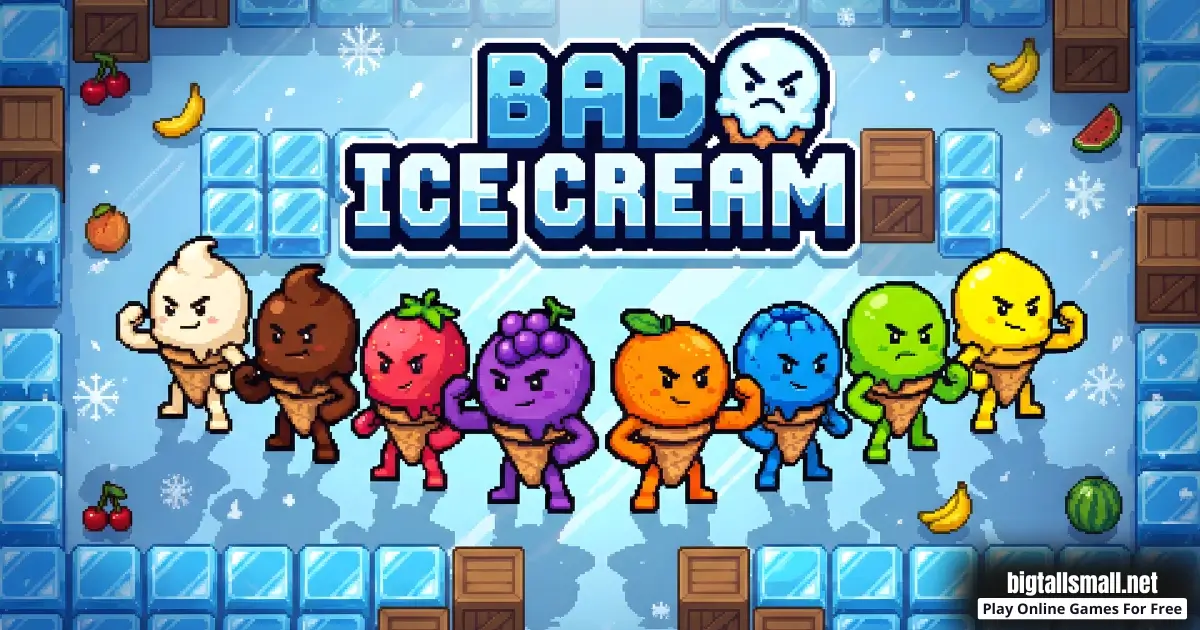
Bad Ice-Cream is a fast, top-down arcade puzzle game you play in your web browser. Each stage is a grid maze filled with fruit, ice blocks, and enemies that patrol in patterns. You win by collecting all fruit on the map, then reaching the exit safely.
The cool twist is your ice power. You can create ice blocks to build walls, and you can break ice blocks to open paths. When you learn to place ice like a smart door, you can slow down danger and move around the maze safely.
The game was made by Nitrome. Learn more about the studio on Wikipedia. The original release is often listed as December 2010.
Because bad ice-cream is a browser game, it is easy to start: open the page, press play, and you are in a level. No long menus, no confusing setup, just quick puzzle action.
Bad Ice Cream Gameplay
Every level starts with fruit scattered around the maze. Enemies move around at the same time, so you must think while you move. Some enemies go back and forth in straight lines. Others wander and can surprise you if you enter a tight hallway.
Your character moves on a grid, tile by tile. That is important because your ice also follows the grid. If you stand one tile off, your wall might not land where you want. A great habit is to line up, place ice, then move again.
Your main loop is simple: move, block, grab, escape. Move toward a fruit group, drop a short ice ice wall to cut off an enemy, grab the fruit, then break your own ice to leave. The best plays feel like you are drawing safe routes across the map.
Ice is both defense and control. A wall can stop an enemy chase, but it can also guide enemies away, like traffic cones in a maze. If an enemy is always in your way, try blocking one corridor so it walks somewhere else.
Try this mini plan: first clear fruit near your start, then clean the edges, then go for the risky center fruit last. This keeps you from getting surrounded too early, and it makes the timer feel calmer.
Bad Ice Cream Levels, Modes, Characters, and Co-op
bad ic3cream is built around short levels that get harder as you go. Many players aim to clear all 40 stages. There are no big upgrade menus, so your progress comes from skill: better timing, cleaner routes, and smarter wall placement.
Levels usually add difficulty in friendly ways. You might get tighter corridors, more enemies, or fruit that is tucked behind ice clusters. Some stages feel open and easy, and others feel like a little maze trap. The good news is that the rules do not change, so practice always helps.
You can often choose between different ice cream flavors as characters. The characters look different, but the core abilities stay the same. That means you can pick your favorite without worrying about stats.
Many versions also include local 2 player co-op on one keyboard. Co-op is great for kids and friends because you can save each other with quick walls. The easiest teamwork tip is to split the map into zones so you do not bump into the same danger.
- Easy levels: learn movement and collect fruit in simple rooms.
- Middle levels: use ice doors to block hallways and manage chases.
- Hard levels: plan your route first, then take fruit in small, safe bites.
Platform
You can play bad ic3cream in your web browser on desktop, laptop, Chromebook, tablet, or mobile depending on the version. A keyboard usually feels the most precise for building and breaking ice quickly. If you play on mobile, try holding your device steady so your taps stay accurate.
How to Play Bad Ice Cream game
- Goal: collect every fruit in the maze, then reach the exit.
- Start by scanning the level for fruit clusters and narrow corridors.
- Collect the closest fruit first to create more safe space.
- Use ice to block enemies, protect hallways, and split the map into safer zones.
- Break ice to open new lanes, reach hidden fruit, and free yourself from traps.
- When only a few fruit pieces remain, slow down and take safe routes.
- After the last fruit, head to the exit with protection. Do not sprint through open halls.
Bad Ice Cream Bad Ice Cream game is not only about speed. It is about staying safe. A two second wall can save a full restart, and a calm plan often finishes faster than panic.
First 60 seconds plan
- Look for the biggest fruit cluster. That is often your main target.
- Find the narrowest hallway. That is often the most dangerous spot.
- Clear the nearest fruit first so you have room to dodge.
- Place one short wall to create a safe corner you can return to.
- Move to the next fruit cluster using the safest lane, not the shortest lane.
If you follow this simple start, you usually avoid early chaos. You also learn where enemies like to walk, which makes later moves easier.
Common mistakes to avoid
- Do not chase one fruit while an enemy is close. Block first, then grab.
- Do not build a huge wall with no exit. Always leave a doorway.
- Do not run into the center at the start. Clear edges first.
- Do not break every ice block. Some ice is protection you can keep.
Bad Ice Cream Controls
Controls are simple and browser friendly.
- Player 1: Arrow keys to move, Space to create or break ice.
- Player 2: W, A, S, D to move, F to create or break ice.
On phones or tablets, some versions show on-screen buttons. If the controls feel hard on touch, try playing on a device with a keyboard. You will place cleaner walls and waste fewer moves.
Quick fix: if your keys stop working, click once inside the game screen so your browser focuses on the game. If it still feels odd, refresh the page and close extra tabs.
Troubleshooting quick fixes: If the game looks zoomed in, press Ctrl and 0 to reset zoom. If sound is too loud, lower your browser tab volume. If the screen is black, refresh once. If loading is stuck, try another browser like Chrome or Firefox.
Bad Ice Cream Tips and Tricks
- Build short walls, not huge mazes. Small walls are faster to place and easier to escape.
- Make ice doors. Leave a one tile gap you can close and open quickly.
- Clear safe fruit first. The fruit near your start gives you room to dodge later.
- Split the map in two. One well placed wall can keep enemies on one side while you clean the other.
- Use corners like shields. Turn a corner, drop ice behind you, then breathe.
- Do not get greedy. If a fruit is risky, grab one, retreat, then return when it is safer.
- Watch enemy rhythm. Many enemies move in patterns you can learn in a few seconds.
- Protect your exit route. Try to keep at least one clean path toward the exit.
- Break shortcuts. If you keep looping, open a new lane so you stop running in circles.
- In co-op, pick roles. One player blocks and baits enemies, the other collects fruit.
Easy strategies for hard levels
When levels get harder, the best trick is to make the level smaller. A big open map can feel scary when enemies are everywhere. One wall can turn a big space into two small spaces. Then you clear one half, and you only face half the danger.
- Make a safe home corner. Clear it fully and return to it when you feel chased.
- Clean fruit in groups. Do not zigzag for single pieces unless it is safe.
- Use bait. Step into a hallway to pull an enemy, then block it and walk away.
- Keep a panic door. Leave one wall spot you can place fast when trouble arrives.
Co-op teamwork tips
Two players can make Bad Ice Cream online feel much easier, but only if you stay organized. The fastest teams talk in short callouts and avoid crossing paths.
- Split the map: one player takes left fruit, the other takes right fruit.
- Save your partner: if they are chased, drop a wall behind them.
- Do not trap your friend: do not close a doorway when they are inside it.
- Switch roles: if one player is always blocking, swap so both can collect.
Mini scenario: you need the last fruit in a long hallway and an enemy is nearby. Close the hallway entrance with ice, grab the fruit, then break your wall and leave before the enemy returns.
Try this practice trick: replay one tricky level twice. The second try often feels much easier because you already know where the danger likes to travel.
Bad Ice Cream Game Features
- Quick maze stages that feel like mini puzzles with action.
- Create and break ice to control the map in real time.
- Easy goal for kids: collect fruit, then escape.
- Enemies with patterns that reward careful observation.
- Local co-op in many versions for teamwork on one keyboard.
- Short rounds that fit quick play sessions.
- Pixel style visuals that keep hazards easy to spot.
- Increasing challenge across many levels without complicated menus.
- Simple controls that feel great for browser play.
Bad Ice Cream Download
Bad IceCream is best known as an online browser game, so you can play with no download on our game page. If you are looking for apps with a similar name, you can check the official store search pages below. Always read the listing carefully and choose safe, trusted apps.
For Android: https://play.google.com/store/search?q=Bad%20Ice%20Cream&c=apps&hl=en
For iOS (iPhone or iPad): https://apps.apple.com/fr/iphone/search?term=bad%20ice-cream
If you only want quick play, the browser version is the simplest choice because it works right inside your internet browser.


Bad Ice Cream Unblocked
You do not need a special unblocked version to play on our site. Just open the browser game page and play normally.
If you are on a school or work network, be respectful of the rules. This guide will never suggest bypassing filters or using risky tricks. If the game is blocked there, play later at home or on a personal network where you are allowed to play.
Tip: if the game does not load, try refreshing once, then check your connection. Sometimes a slow network can look like a block.
Bad Ice Cream Github
You also do not need to search for Bad Ice Cream Github to find a playable version. The simplest option is to use the official browser game page on our website, where you can start quickly and safely.
Why You'll Love It
- It is easy to learn, but it stays interesting because ice changes every level.
- Each win feels earned when you solve the maze instead of only running fast.
- Building walls feels powerful and funny, like making a tiny snow fort.
- Levels are short, so it is perfect for quick breaks.
- Co-op can be exciting when you save your friend with a last second wall.
Try this: after you win a level, replay it and try to use fewer walls. Cleaner runs show real improvement.
Bad Ice Cream Details
Requirements
To play this game, all you need is a computer, an internet connection, and a web browser. No downloads are required!
Release Date
December 10, 2010
Developer
Bad Ice Cream Bad Ice Cream was developed by Nitrome.
Platform
Web browser (desktop and mobile)
Technology
Built using HTML5 technology
Similar Games to Bad Ice Cream
If you enjoy this style of browser puzzle action, try these games next. You can also find more in our Puzzle Platformer Games category.
- Big Tall Small
- Fireboy and watergirl
- Snail Bob
- Bad Ice Cream 2
- Bad Ice Cream 3
- Cut the Rope
- Bob the Robber
- Temple of Boom
- Bad Ice Cream 4
- Bad Ice Cream 5
- Human Fall Flat
- Snipperclips
- Money Movers
- Money Movers 2
- Red Ball 4
- Duo Survival
- Jim Loves Mary
- Vex 3
- Vex 4
- Fancy Pants Adventure
FAQ
Is Bad Ice Cream free to play online?
Yes. You can play Bad IceCream online for free in your web browser on our site.
Is Bad Ice Cream safe for kids?
Bad IceCream is a cartoon style browser game with simple goals. Enemies are silly game characters, not real life danger. Younger kids may want help with later levels.
How do you beat a level in Bad Ice Cream?
Collect all fruit first, then go to the exit. Use ice to block enemies and keep a safe path for your escape.
Can I play Bad Ice Cream on a Chromebook?
Often yes, because it is a browser game. If your Chromebook has a keyboard, controls usually feel smooth and precise.
Does Bad Ice Cream have 2 player mode?
Many versions support local co-op on one keyboard. One player can block and distract while the other collects fruit, then you switch roles.
How many levels are in Bad Ice Cream?
The original game is commonly listed as having 40 levels, with difficulty increasing over time.
What should I do when the timer is low?
Stop taking big risks. Focus only on the last fruit pieces you need, then take the safest route to the exit.
Why do I get stuck behind my own ice?
It happens when you close a corridor with no exit. Leave a small doorway, or break a block right after you pass through.
My keyboard controls are not working. What should I do?
Click inside the game window to refocus your browser. You can also refresh the page and close extra tabs that may steal keyboard input.
Why is Bad Ice Cream Bad Ice Cream laggy in my browser?
Close extra tabs, refresh the game page, and make sure your browser is updated. On older devices, fewer background apps can help the game run smoother.
Do I need a Bad Ice Cream unblocked page?
No. You do not need a special unblocked page for our website. Open the game page and play normally when you are allowed to.
Do I need to download Bad Ice Cream game?
No download is required to play the browser game. The download links above are only for store searches if you are browsing app listings.
Conclusion
Bad Ice Cream game is a smart and silly browser puzzle game that mixes maze collecting with ice building. The rules are easy to understand, but the strategy grows as levels get tighter and enemies get trickier. If you like quick puzzles with action, this is a great pick for solo play or co-op on one keyboard.
Ready for a frosty challenge? Open the game page, collect your first fruit, and build your way to the exit.
keywords: